Take Screenshot with JAVA phone
HOW TO TAKE SCREENSHOTS ON JAVA PHONES.
Some days back,I gave a tutorial on how you can take screenshots of anything displaying on your mobile using a small but powerful application called “screenshot”. Like I mentioned in that post,this software can only work for symbian s60 users.But hey,why should Java users be left out?!!!.
So today,I will be sharing with us another trick with which you can take screenshots on Java phones.
In this tutorial,we will be making use of this popular and one the world's most used mobile browser |OPERAMINI.| Yeah,that's right!!you can take screenshots using operamini.Though,not all operas take screenshot,this version does.
OPERAMINI WITH SCREENSHOT.
For the benefit of this tutorial,it would be better if you had a better understanding of this operamini[Opera mini Mod 4.21 beta9HandlerUI]
Features of Operamini4.21beta9UI
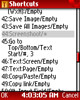 Application was modded by YKhandler
Cheat enabled->If you have a cheat you want to use,you can.And if not,it can work without one.
Application in .jar extension
Built in File manager
Powerful download ability
Screenshot embedded+ many more....
Due to difficulty in downloading the software from the main site,I 've uploaded it to another server[virus free]. |DOWNLOAD IT HERE!|
Download the file above » Install/Launch it and follow the instructions below to take screenshots with it.
HOW TO TAKE SCREENSHOTS USING OPERAMINI.
First things first,Choose a folder to save your screenshots by going toMenu»Tools»Settings»General
Scroll down to “Path for Saving Screenshots” and choose the path you want your shots to be saved. Save the settings.
Go to Menu again,but this time,select Navigation

Locate “Shortcuts” and click on “Edit”
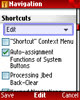
Scroll down to Number “44” where you see “Screenshot/Empty”,click on it and press your desired shortcut there[You'll use this whenever you want to take a screenshot]
Save modifications.
Press the shortcuts you inputed in the settings to be sure you made no mistakes.If properly done,the screenshot of the application's front page should be saved to the path you specified above.
Now anytime you want to take a screenshot,just press the shortcut
That's all!!!.Make sure you share this post with your friends... Again,here's the download link ~ Opmod421b9hui202
Posted By Anand Raj

Comments